Same SQL, Five Surprises: What Governed Access Actually Looks Like Across Five Engines
Your tenant admin runs SELECT count(*) on the customer table and gets zero rows. Marketing joins two CRMs by email without seeing an address. Five mechanics most teams do not expect from engine-level data governance.
You already know the post-merger data problem. Two companies combine, nobody migrates the old systems, and every team wants answers from the same customers without waiting on a ticket queue or emailing CSV exports around.
Instead of rehashing that problem, let’s look at five things that genuinely surprise engineers and data protection officers when access rules, dynamic column masking, and row filters run inside the query engine itself.
The live demo setup (in 20 seconds)
To test all five mechanics end to end, we set up a demo workspace in Classifyre for a fictional European tour operator called Kestrel & Finch Journeys — built from a merger between Kestrel Reisen (Innsbruck) and Finch Tours (Edinburgh). Five systems stay in place without migration:
| System | Engine | What lives inside |
|---|---|---|
| Kestrel CRM | PostgreSQL | 189 contacts (email, phone, birthday, Austrian SVNR, marketing opt-in), deals, notes |
| Finch CRM | Delta Lake on S3 | 156 contacts (after 1 GDPR Art. 17 Delta delete), passport numbers, dietary needs, opportunities |
| Wayfarer Club | Apache Iceberg (Polaris) | 186 loyalty members with IBANs, tiers, and points |
| Support desk | DuckLake | 181 tickets — including two agents who pasted an AWS key and a live Stripe key into notes |
| Legacy billing | PostgreSQL via ODBC only | 510 invoices with IBANs and a legacy payment card table |
One traveller, Margarethe Albrecht in Innsbruck, appears in all five systems
with her email spelled in three different letter cases
(margarethe.albrecht@…, Margarethe.Albrecht@…, MARGARETHE.ALBRECHT@…).
She opted out of marketing emails at Kestrel, holds Falcon tier in Wayfarer,
and opened a support ticket asking for gluten-free meals on her boat trip.
Ten colleagues in a Keycloak organization — plus an external campaign agency — all query this workspace using plain SQL, Metabase, or ODBC.
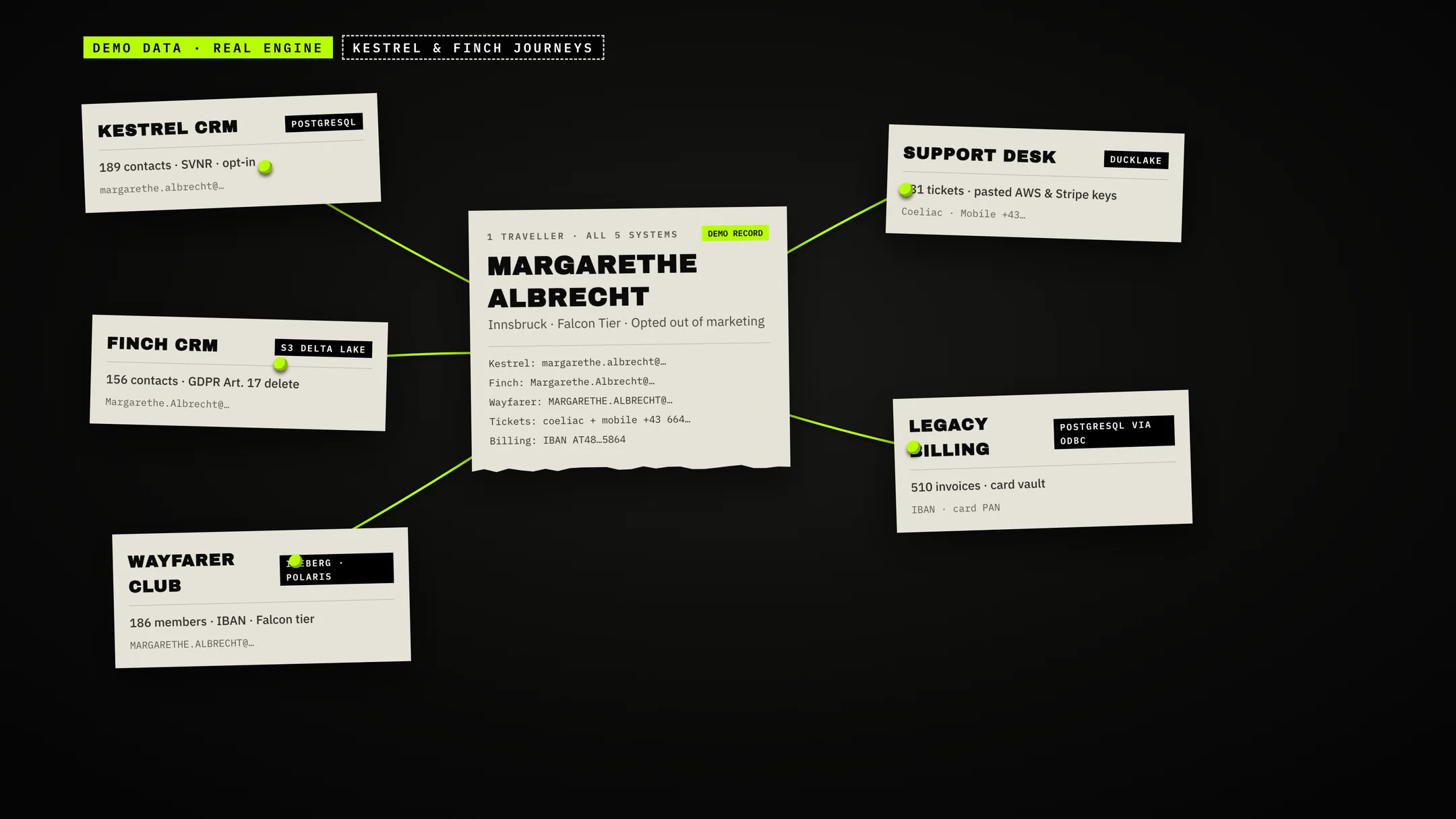
Kestrel & Finch Journeys, Margarethe Albrecht, and all employee, customer, ticket, and invoice records are fictional demo data. Classifyre, the SQL queries, column masks, row filters, Metabase dashboard, and audit logs are real, verified live on 2026-11-27. Video stills below include the video’s lime callout highlights.
Surprise 1: The tenant admin gets zero rows — and clear access still hides restricted columns
Most platforms assume that a tenant administrator automatically sees every row in every table. In Classifyre, row filters fail closed, and they bind admins too.
Ines Kovač is the tenant admin in the /admins group. When she runs a count on
kestrel_crm_hubspot_sync.crm.contacts, no row filter rule names /admins, so
the query returns 0:
SELECT count(*) AS contacts
FROM kestrel_crm_hubspot_sync.crm.contacts;
-- Result for Ines Kovač (/admins): 0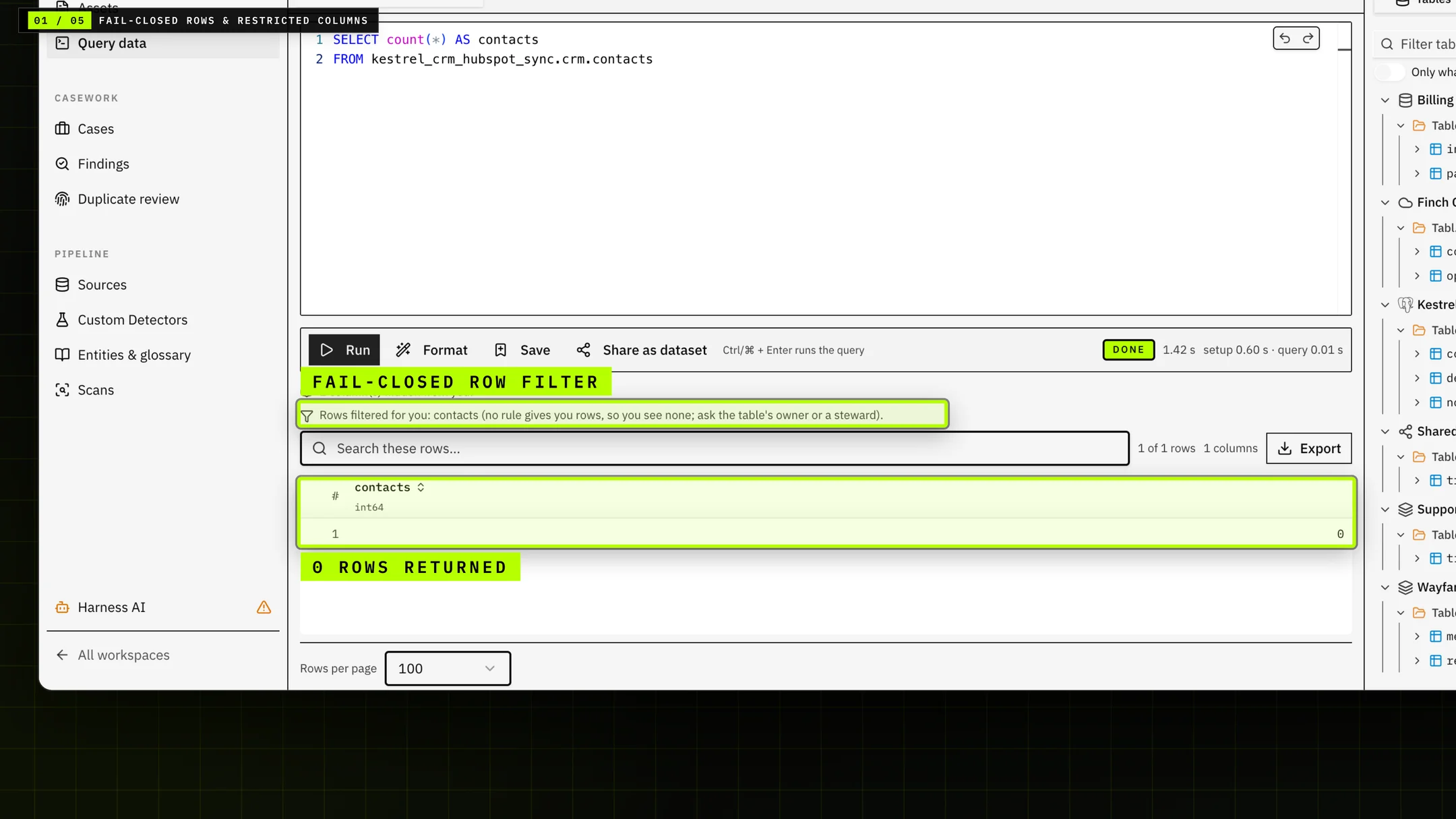
That is not a silent trap either. Inside the table’s Governance → Rows
step, Classifyre warns the table owner directly that /admins can query the
table but has no matching rule, so they will see no rows.
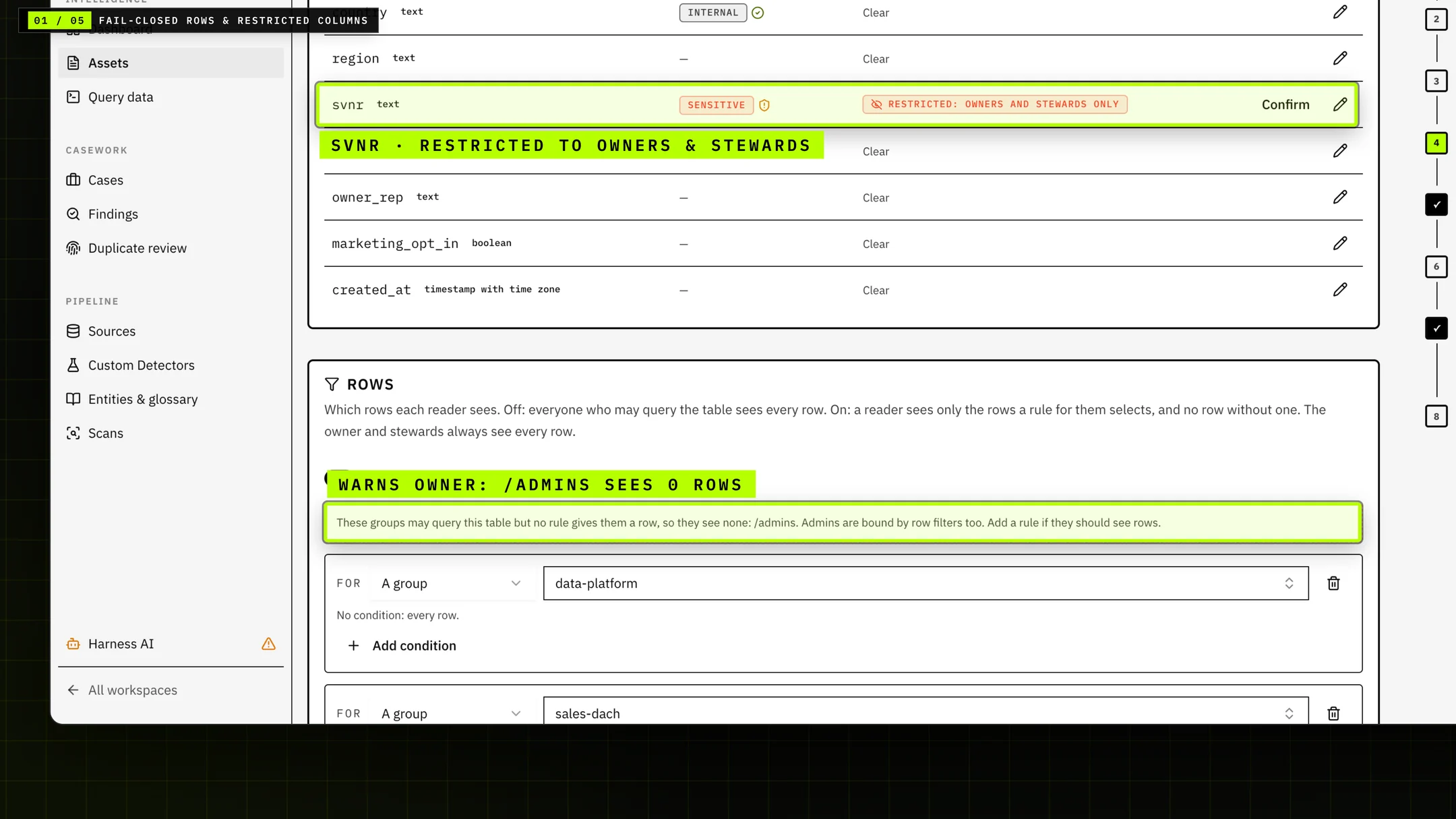
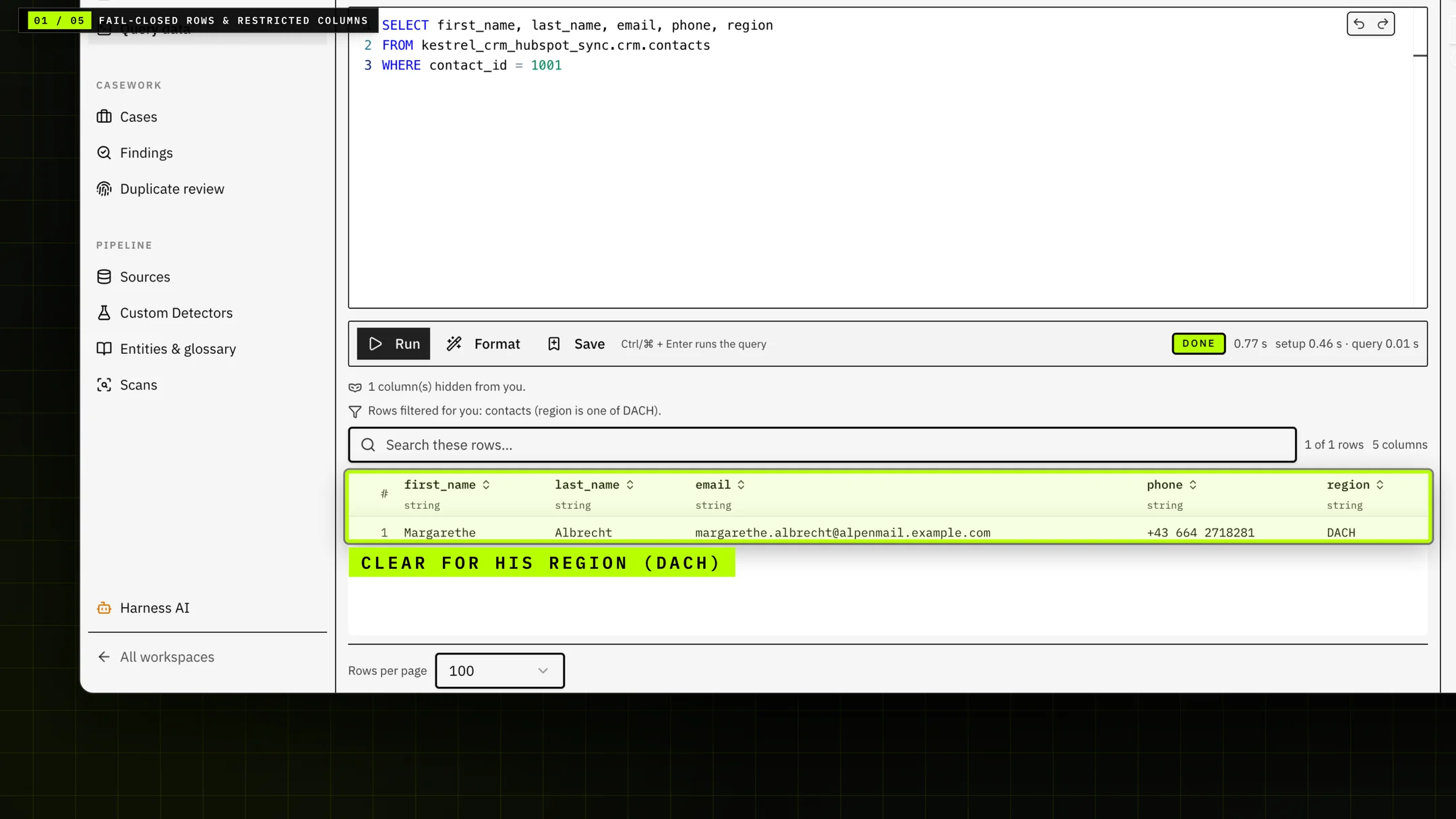
Right above that warning sits the second half of the surprise. Lukas
Brandner in DACH sales holds the Data reader, unmasked role with a DACH row
filter. He queries Margarethe Albrecht and gets her real email and Austrian
phone number (+43 664 2718281) in clear — because she is his customer.
Yet her Austrian social insurance number (svnr) is still hidden from him
(1 column(s) hidden from you). Because the data protection officer marked
svnr as Restricted, even unmasked readers cannot see it. Only the table’s
owner and stewards read restricted columns in clear.
Surprise 2: Joining two CRMs by email without seeing one address — and WHERE cannot cheat
Now Amélie Fontaine in marketing runs SQL on the exact same crm.contacts
table:
SELECT first_name, email, phone, birth_date, region, marketing_opt_in
FROM kestrel_crm_hubspot_sync.crm.contacts
LIMIT 20;
Two rules fire at once:
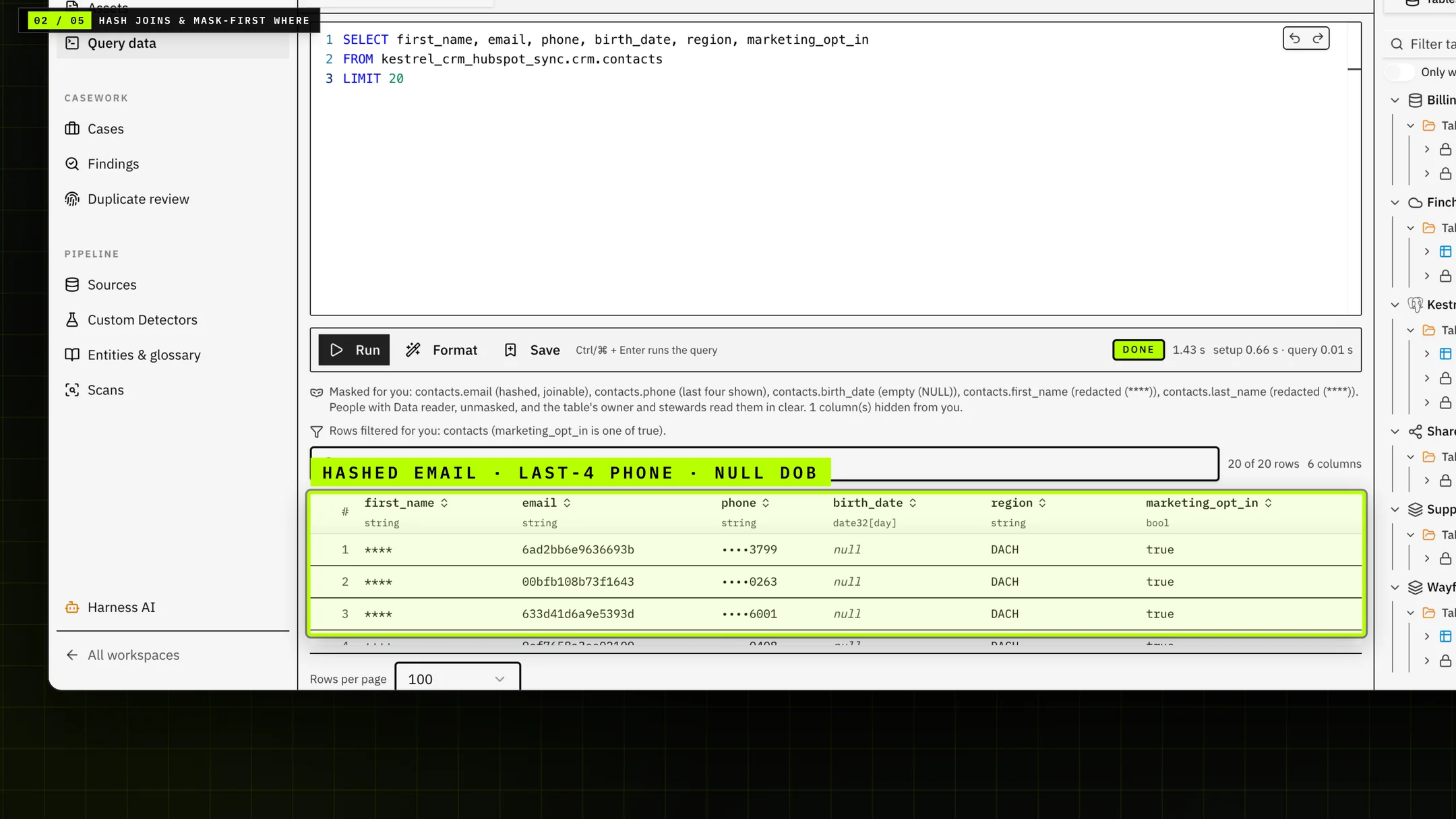
- Consent is a row filter. Amélie sees 114 opted-in rows (
marketing_opt_in = true). Margarethe Albrecht opted out, so she does not exist in Amélie’s results at all. - Dynamic column masks run inside the engine. Names become
****, phone numbers show only the last four digits (••••3799), birthdays becomeNULL,svnris dropped completely, and emails become a deterministic 16-character hex token (6ad2bb6e9636693b).
In output-only masking tools, a user can still leak hidden values by probing
them in a WHERE clause (WHERE email LIKE 'm%'). In Classifyre, masking
runs before filters and joins. When Amélie tests:
SELECT count(*) AS matches
FROM kestrel_crm_hubspot_sync.crm.contacts
WHERE email LIKE '%@%' OR phone LIKE '+43%';
-- Result: 0
She gets 0. The same goes for searching a specific real email address.
Yet here is what surprises analytics teams: Amélie can still deduplicate
customers across PostgreSQL and S3 Delta. Deterministic hashing normalises
letter case before hashing, so margarethe.albrecht@…,
Margarethe.Albrecht@…, and MARGARETHE.ALBRECHT@… produce the exact same
token (aa7969be165fa500) across every source in the workspace:
SELECT k.region, count(*) AS in_both_crms
FROM kestrel_crm_hubspot_sync.crm.contacts k
JOIN finch_crm_salesforce_export.kestrel_finch_finch_salesforce.contact f
  ON k.email = f."Email"
GROUP BY 1
ORDER BY 2 DESC;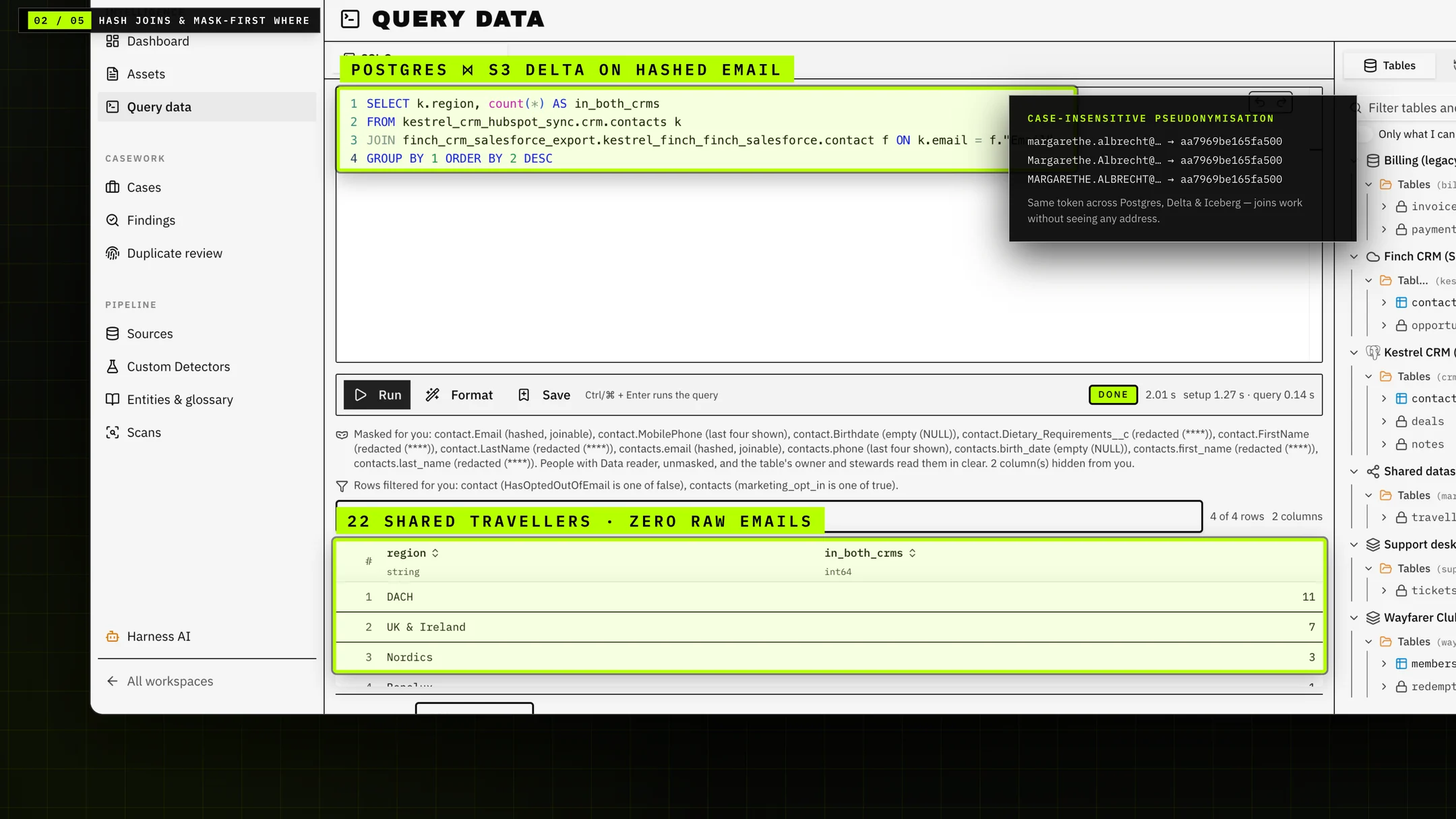
She matches all 22 consented travellers who appear in both CRMs (11 in DACH, 7 in UK & Ireland, 3 in Nordics, 1 in Benelux) without seeing a single real address.
(One important distinction for GDPR work: deterministic salted hashing is pseudonymisation, not anonymisation — it supports data minimisation in daily analytics while keeping join keys functional.)
Surprise 3: Two pasted API keys do not break the support team’s ticket table
Free-text columns are where static masking usually falls apart. In the DuckLake
support desk (support_desk.support.tickets), two agents pasted an AWS access
key and a live Stripe secret key into internal ticket notes. Travellers also
pasted card numbers, passport numbers, IBANs, and mobile numbers.
If you classify body as secret and apply standard column redaction (****),
customer care loses all 181 ticket bodies and cannot do their job.
Instead, Classifyre supports inline free-text scrubbing (identifiers removed). When Kwame Mensah in customer care queries the support tickets:
SELECT ticket_id, subject, body
FROM support_desk.support.tickets
WHERE ticket_id IN (90001, 90002, 90005, 90007, 90011)
ORDER BY ticket_id;
Classifyre strips only the detected secrets and personal identifiers inline —
replacing them with [phone], [card number], [document number], [iban],
and [key] / [secret] — while leaving the sentence around them readable.
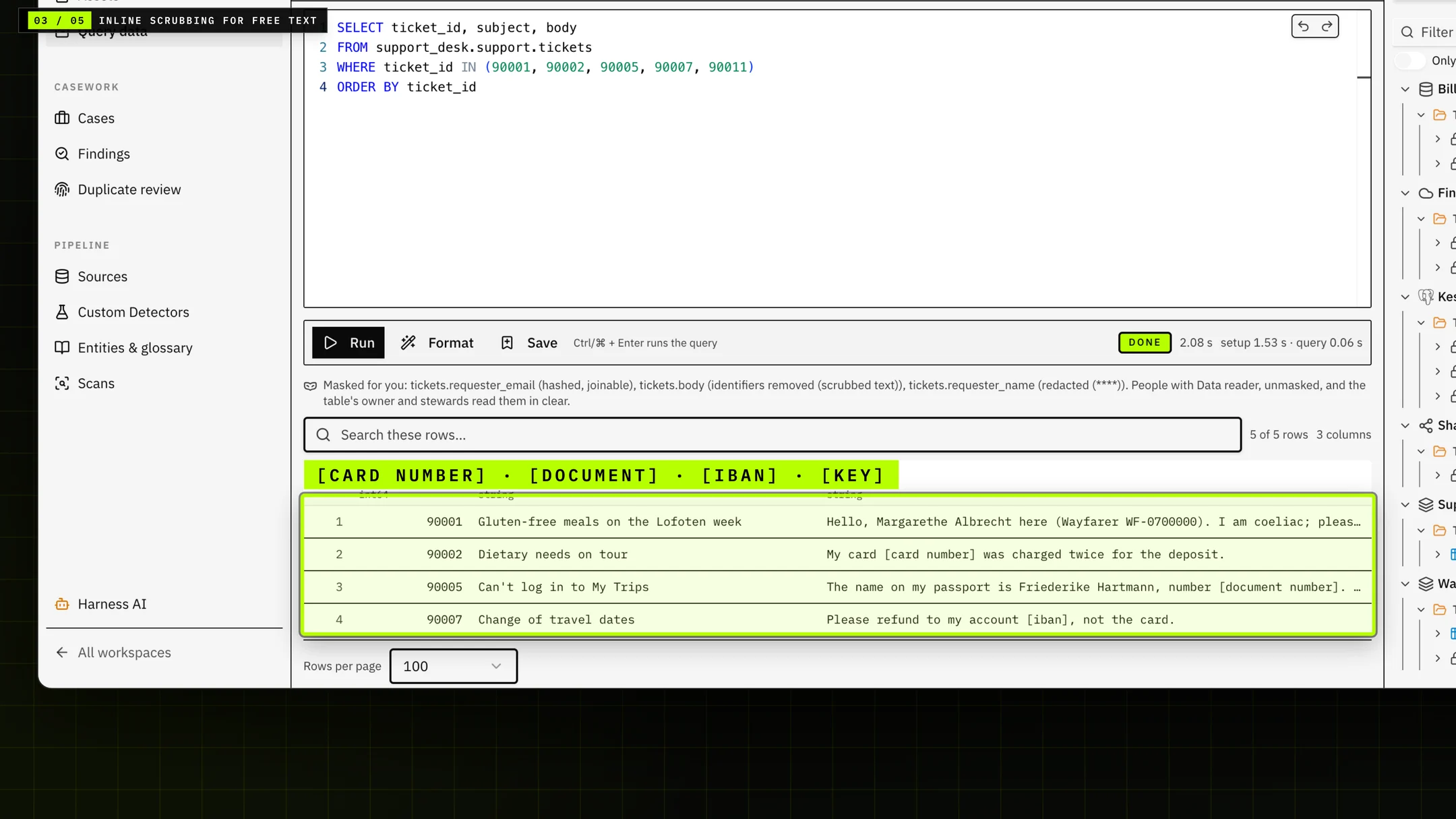
Kwame immediately sees Margarethe’s request (“I am coeliac; please make sure the boat kitchen knows. Mobile [phone].”) without ever seeing a phone number, card number, or cloud key.
Surprise 4: An external agency sees one dataset — and the table owner still knows they read it
Northlight, an outside campaign agency, needs regional counts and loyalty tiers across both CRMs and Wayfarer Club. Normally this turns into a weekly emailed spreadsheet.
Instead, data platform owner Tomasz Wierzbicki publishes a shared
dataset (data product) called shared.marketing.traveller_360 that joins all
three systems with consent applied and source masks kept intact as a strict
floor (email and first_name redacted to ****).
Jonas Eklund from Northlight signs in with the Data consumer role plus a grant on that single dataset:
- His sidebar shows only Query data and Cases — no Findings, no Sources, no Assets, no Scans.
- His table catalog lists only
shared.marketing.traveller_360(197 consented travellers). - Direct API requests to findings, sources, or audit logs return
403 Forbidden.
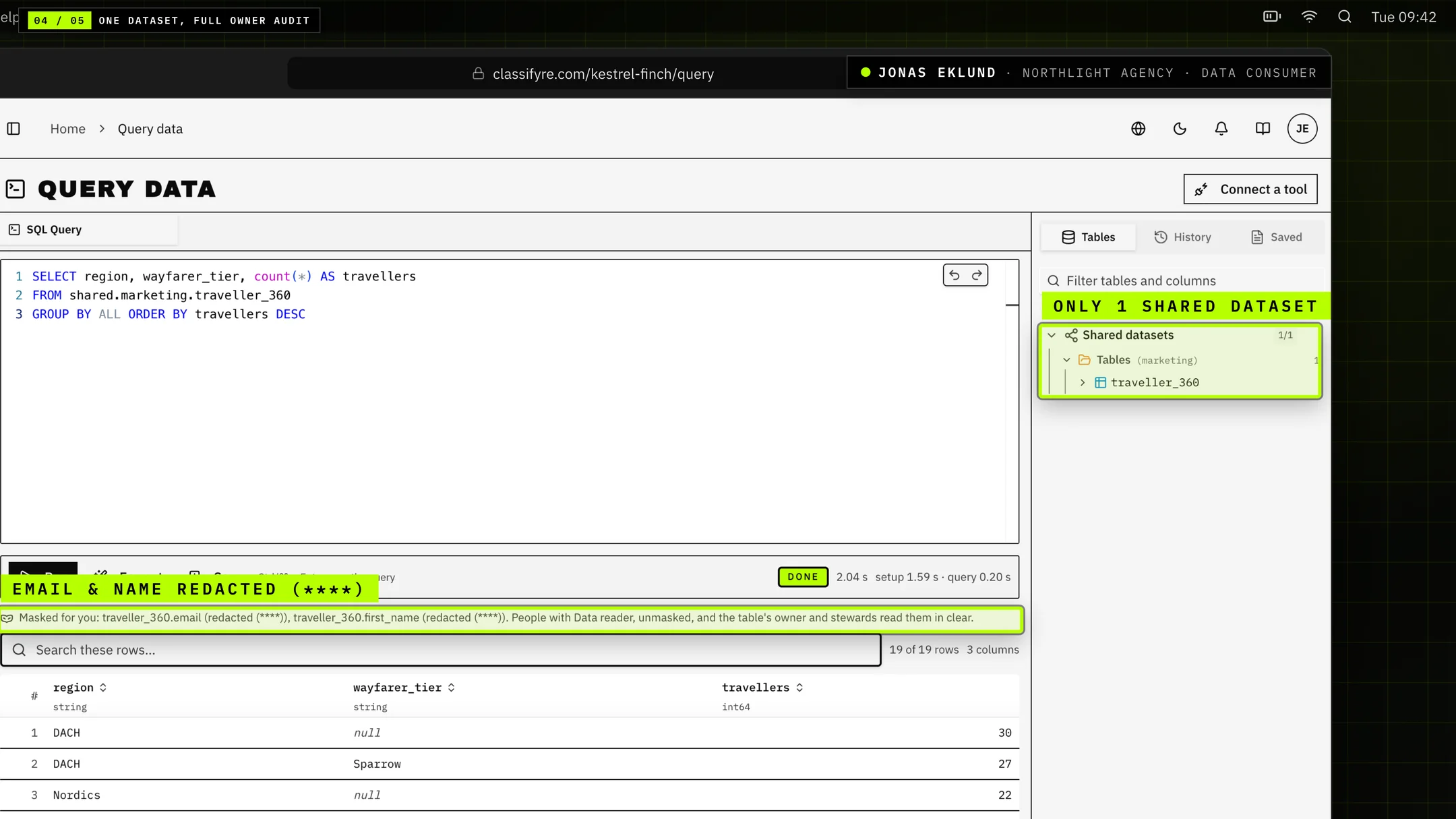
Here is the second half of the surprise: when Jonas queries
shared.marketing.traveller_360, Classifyre does not just log a read on the
dataset. It also attributes the read back to the underlying input tables.
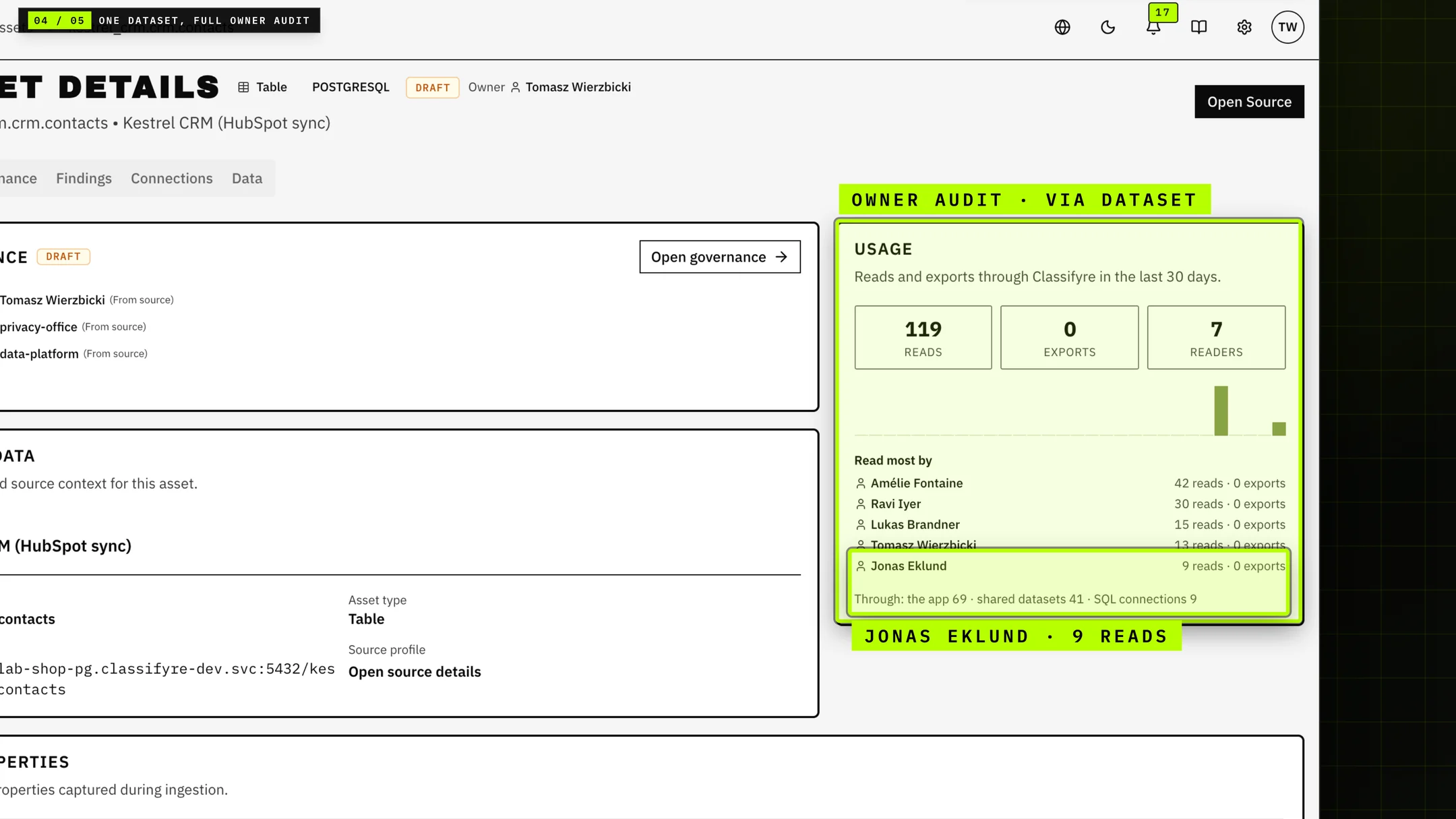
When Tomasz opens kestrel_crm.crm.contacts, the Usage card shows
Jonas Eklund · 9 reads · 0 exports right next to the internal teams, along
with the exact breakdown by channel: Through: the app 69 · shared datasets 41 · SQL connections 9.
Surprise 5: The exact same rules follow data into Metabase, legacy ODBC, and the Findings page
Governance breaks down the moment a BI tool connects with a shared service account. In Classifyre, each user creates their own expiring TLS SQL connection over the PostgreSQL wire protocol, scoped only to what they are allowed to read.
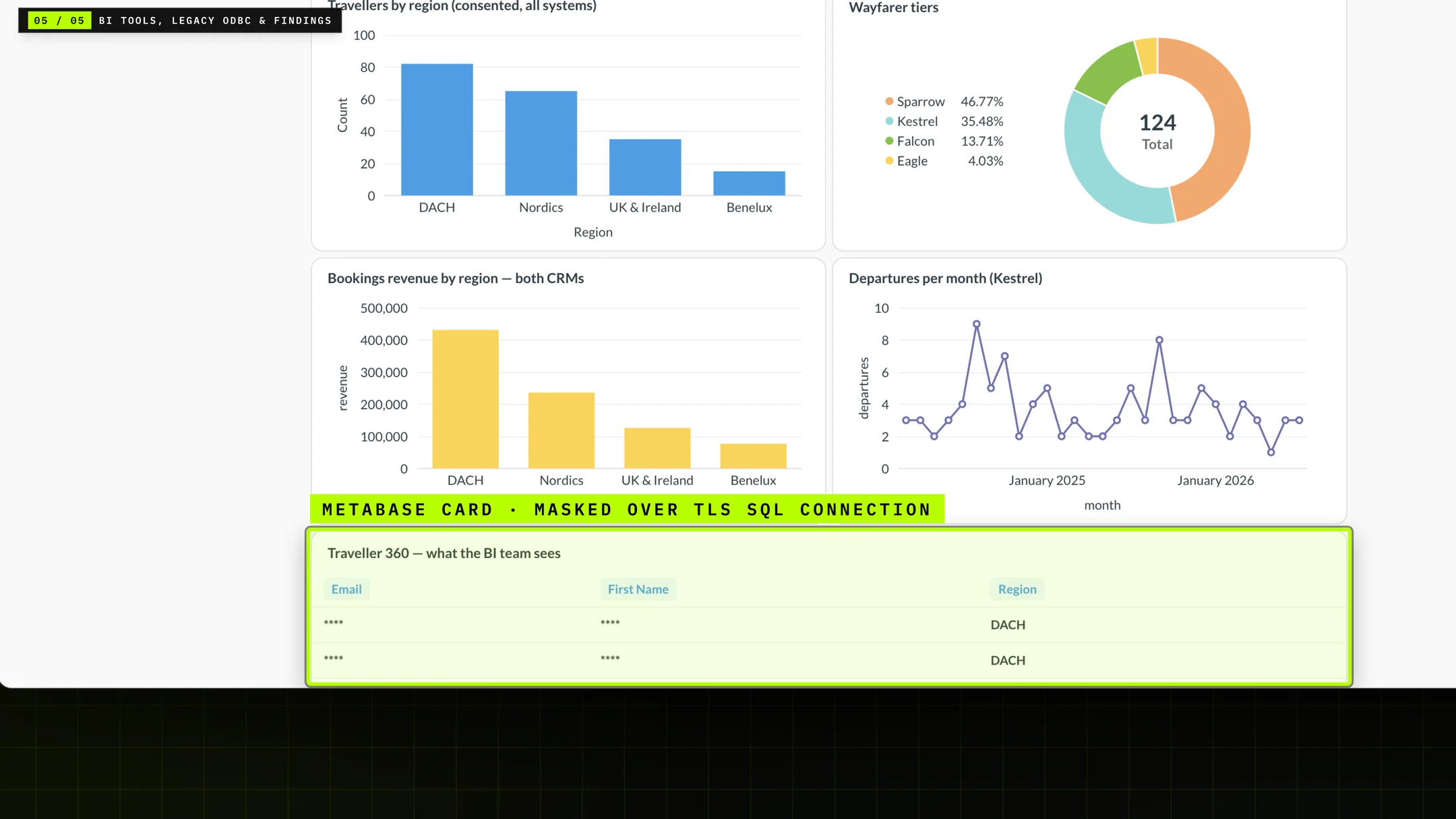
- Metabase: BI analyst Ravi Iyer connects Metabase using his personal
SQL connection. Four cards aggregate revenue, departures, regions, and
Wayfarer tiers across PostgreSQL, S3 Delta, and Iceberg — and the fifth card
(
Traveller 360) prints****for email and name directly inside Metabase.
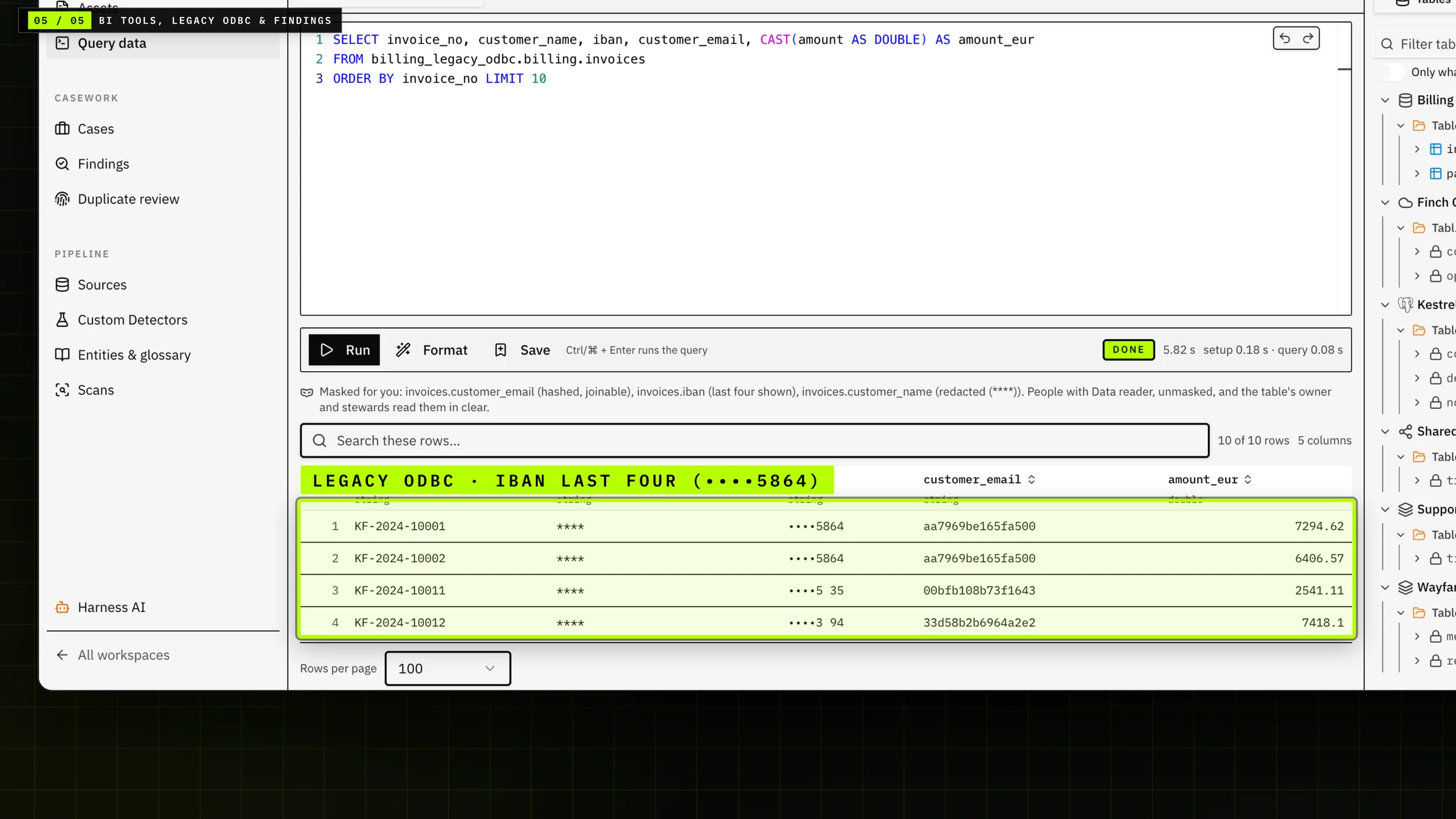
- Legacy ODBC: Finance analyst Olga Lindqvist queries a legacy billing
PostgreSQL instance that only an ODBC driver can reach. The exact same engine
masks apply —
customer_nameis****,ibanshows only the last four digits (••••5864), andcustomer_emailis hashed so she can join invoices to payment cards.
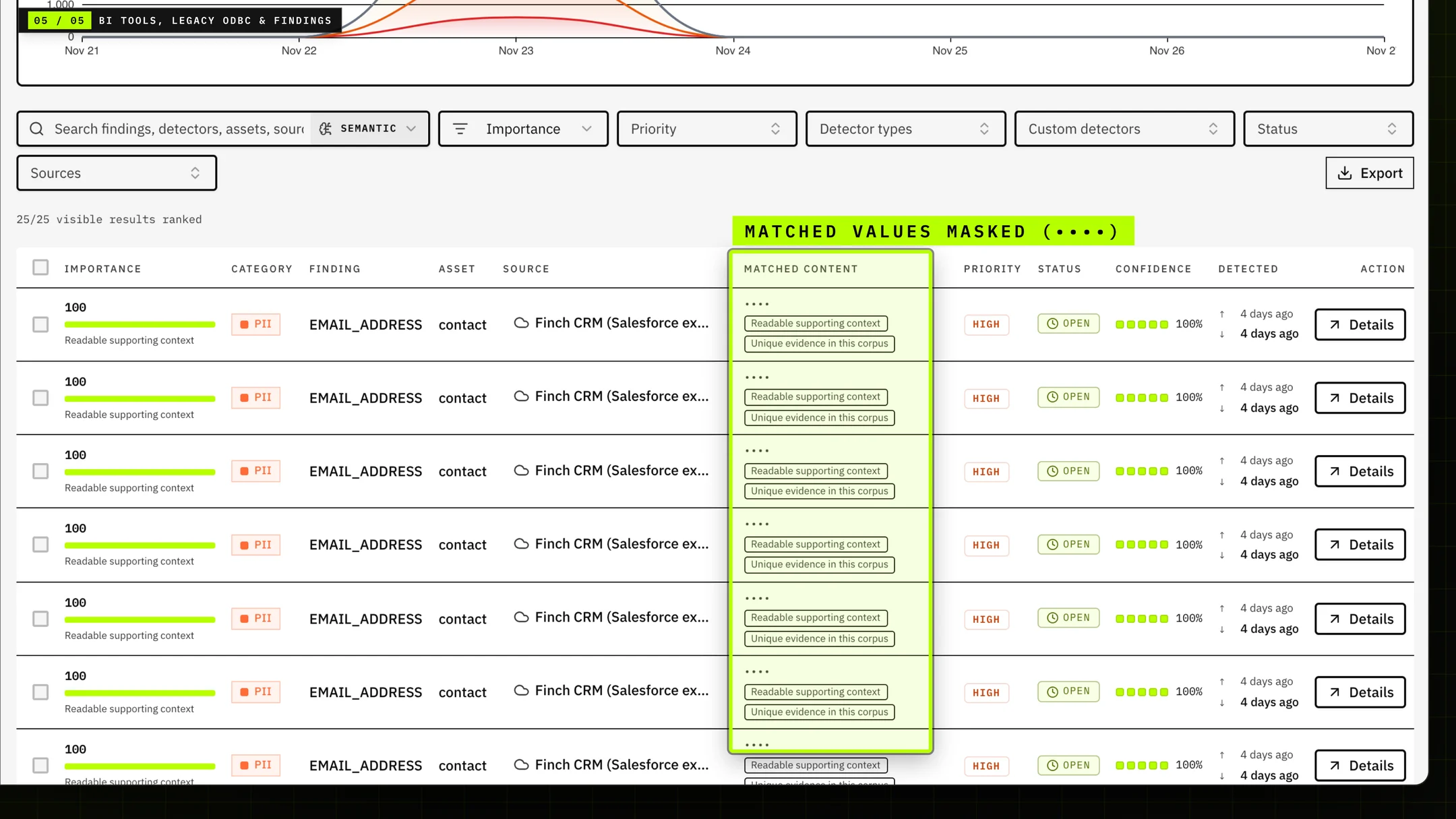
- Findings page: A subtle leak in many governance platforms is the
discovery UI itself — SQL hides the email or IBAN, then the Findings screen
displays the raw matched value to every Viewer. In Classifyre, matched
finding values follow the exact same column masks. When Amélie opens
Findings as a Viewer, every masked column displays
••••instead of the raw email, IBAN, or key.
Five engines, one rule set
None of these five mechanics required copying tables into a new warehouse, writing custom database views per department, or handing out shared BI passwords. Every rule — row filter, column mask, inline scrub, shared dataset floor, and audit entry — runs in one place inside the query engine.
Classifyre is self-hosted and open source under Apache-2.0. You can run it locally with Docker or explore the documentation to map your own identity groups and data sources.
Get ClassifyreMore from the blog
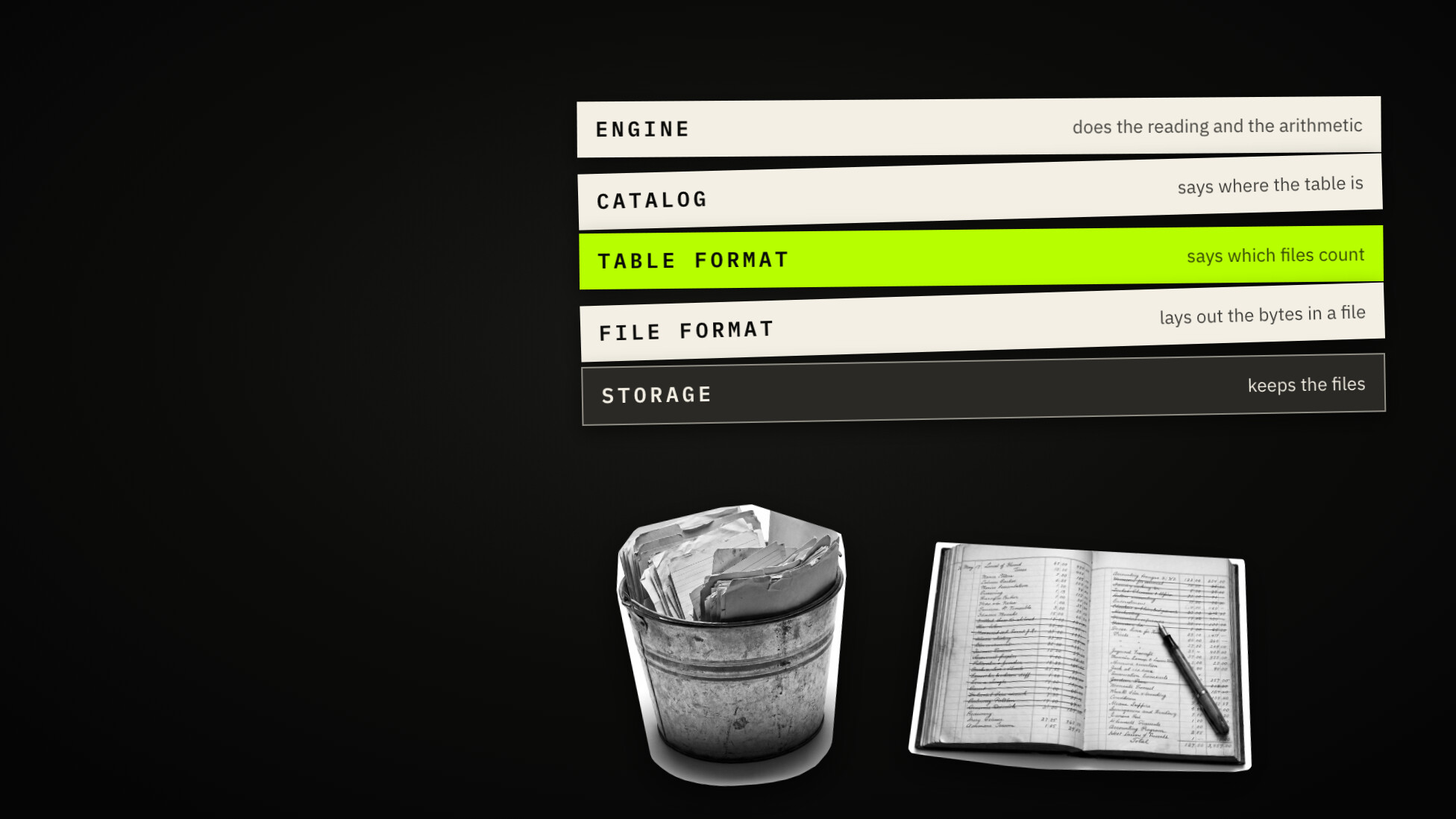
Tables Made of Files: What a Lakehouse Is and When to Use One
What a data lakehouse is, in plain words. File formats, table formats like Iceberg and Delta, catalogs and engines, when to use one, and why delete is not erase.
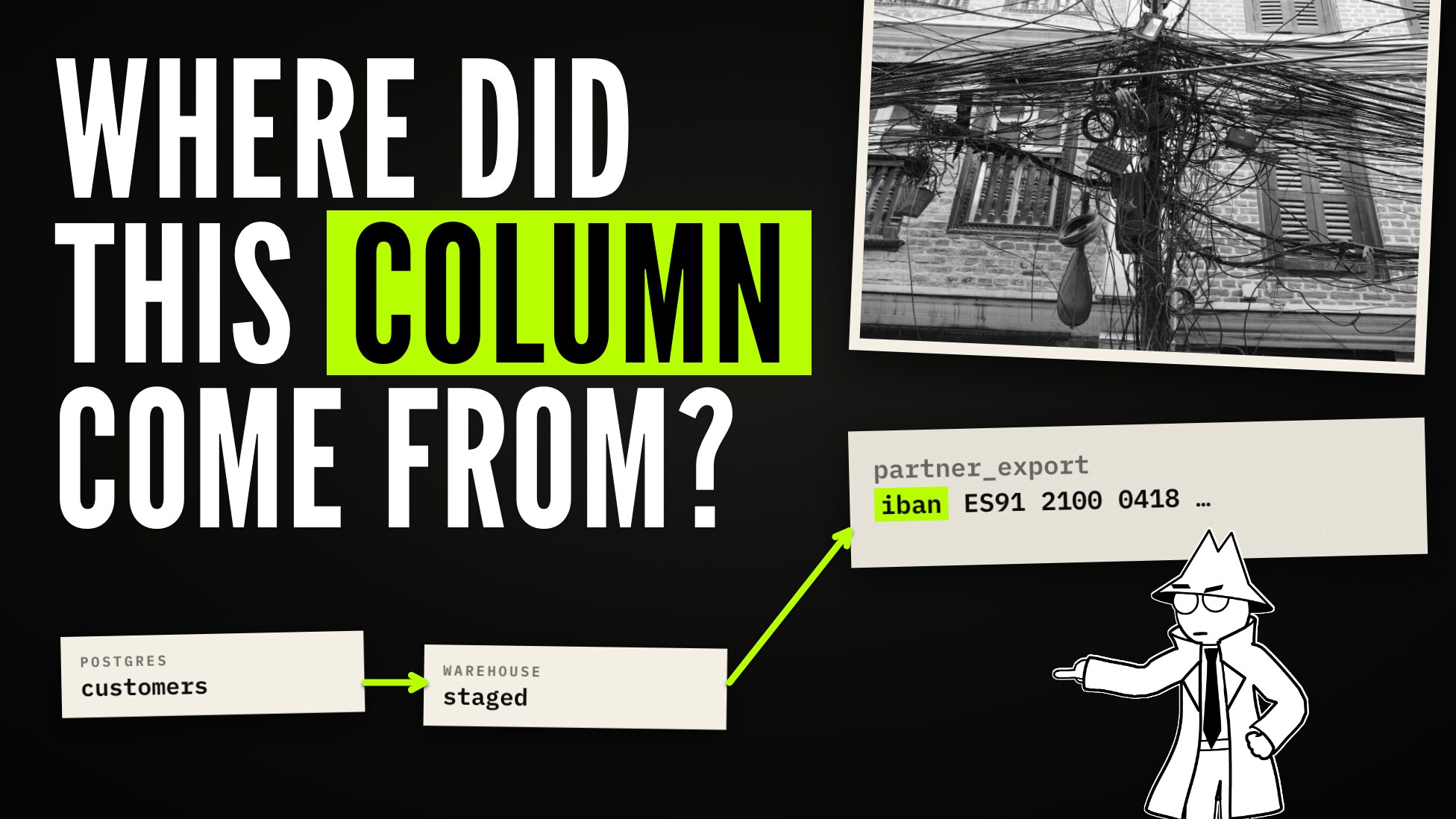
Follow the Data: What Lineage Is and How to Read It
A plain-language explainer on data lineage. Why most lineage graphs are unreadable, what flow means, how column lineage works, how far to trust an arrow, how lineage crosses systems, and one real column followed from a warehouse back into a database.